What is a Modem?
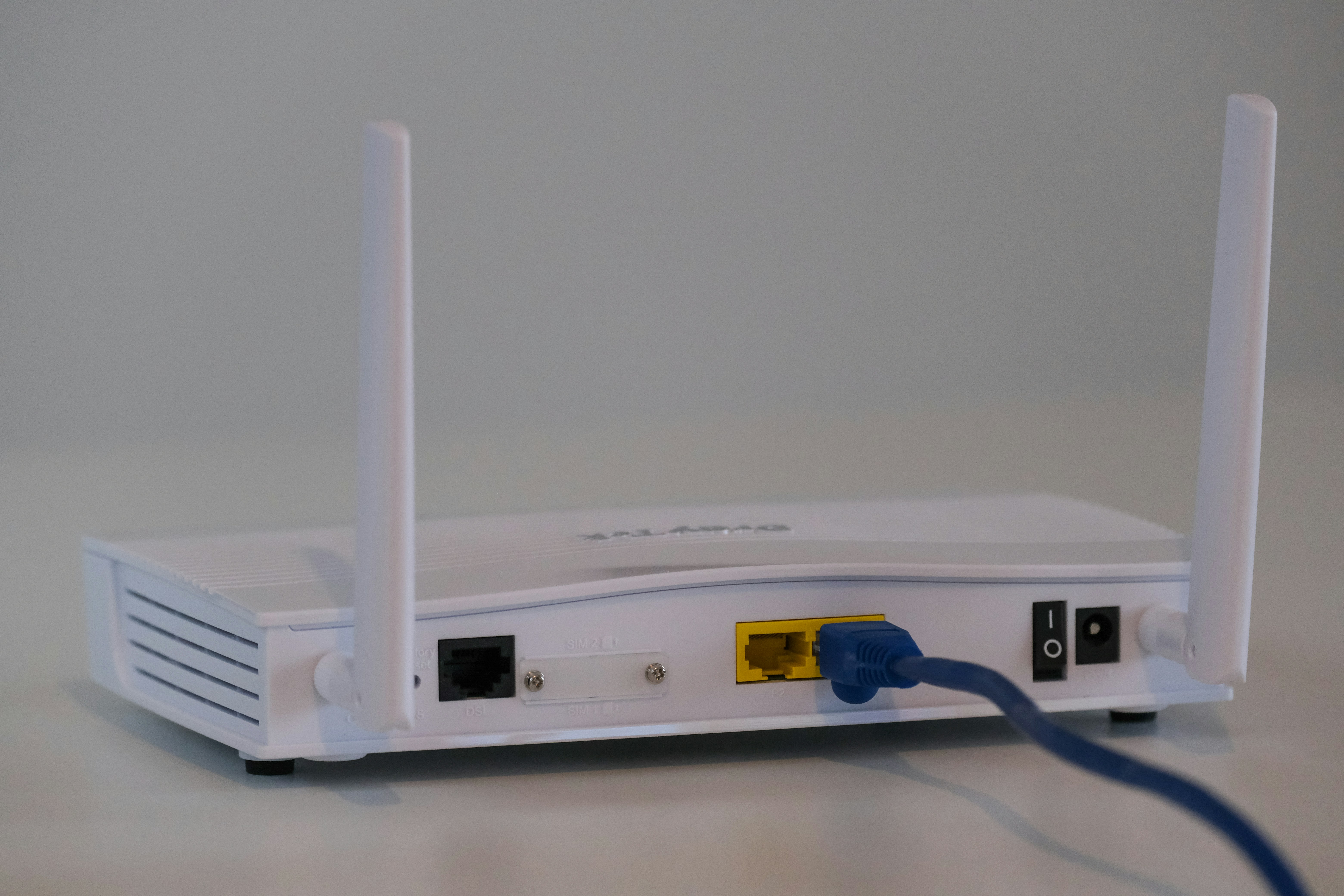
A modem, short for modulator-demodulator, is a critical device that plays a fundamental role in facilitating internet connectivity. Its primary function is to convert digital data from a computer or other devices into analog signals that can be transmitted over telephone lines, cable systems, or satellite connections. Conversely, it also demodulates incoming analog signals from these sources back into digital data that your devices can understand and utilize effectively.
Modems serve as intermediaries between your internet service provider (ISP) and your local network. When you connect your computer to the internet, the modem receives data from the ISP and transforms it into a format that is usable by your device. This process involves translating binary data into a format suitable for transmission via various media. Additionally, depending on the type of modem, this may also involve specialized encoding techniques that optimize signal clarity and speed.
The technology behind modems has evolved considerably from their initial designs. Early modems operated at relatively low speeds and required cumbersome dialing sequences to connect. Today, modern modems are capable of supporting high-speed broadband connections, enabling users to access the internet at phenomenal rates. Cable and DSL modems are the most prevalent types used in households, each suited to different types of internet service.
Additionally, many modems now come integrated with router functions, allowing multiple devices to connect to the internet simultaneously. This integration simplifies user setups and enhances overall connectivity. Understanding the role of a modem is crucial for anyone looking to optimize their internet experience, as it serves as the backbone of the entire network setup.
How Modems Work
At the core of internet connectivity lies the modem, an essential device responsible for data transmission between your home network and the internet. Modems perform the crucial task of converting signals so that computers can communicate over various types of networks. Understanding how modems work involves grasping the concept of signal types, specifically analog and digital signals.
Analog signals are continuous waves that can represent data in a manner that varies in amplitude or frequency. Traditionally, telecommunication systems used analog signals for data transmission, particularly in older telephone lines. In contrast, digital signals are comprised of discrete values, typically represented as binary code—ones and zeros—which are more suitable for modern communication systems.
Modems bridge these two worlds by performing modulation and demodulation processes. In essence, modulation involves converting digital data from your computer into an analog signal suitable for transmission over telephone lines or cable systems. Once the data reaches the destination, the modem at the receiving end performs demodulation, translating the analog signal back into digital data for the receiving device.
There are various types of modems, such as DSL (Digital Subscriber Line) modems, cable modems, and fiber-optic modems. Each type works with specific networks and signal types, but all share the fundamental capability of converting digital and analog signals. Furthermore, advancements in modem technology have led to hybrid models that can handle both forms of signaling, ensuring higher bandwidth and improved stability for users.
Thus, the modem’s role in transforming signals is vital, as it enhances the communication process between your devices and the larger internet infrastructure, making seamless browsing, streaming, and downloading possible.
Types of Modems
Modems serve as a crucial bridge between your home network and the broader internet, enabling connectivity through different technologies. Understanding the various types of modems available can help consumers make informed decisions regarding their internet service options.
One of the most common types is the DSL modem, which utilizes telephone lines to facilitate internet access. DSL (Digital Subscriber Line) modems are prized for their ability to deliver high-speed internet while allowing simultaneous use of the phone line. Their speed, while generally superior to traditional dial-up modems, can vary based on distance from the provider’s central office.
Cable modems are another popular option, connecting to the internet via cable television lines. They are known for providing faster speeds than DSL, making them ideal for households with multiple devices. Cable modems work well for streaming, gaming, and other high-bandwidth activities, although internet speeds can fluctuate based on network congestion during peak hours.
Fiber optic modems represent the cutting-edge of modem technology, using light signals transmitted through glass fibers to achieve exceptional speeds. Fiber optics are less susceptible to interference and provide higher bandwidth capabilities, making them suitable for future-proofing your internet connection. However, availability can be limited in certain areas, as infrastructure for fiber networks is still being developed.
Finally, dial-up modems have largely fallen out of favor due to their slow speed and limited capabilities. Connecting over standard telephone lines, dial-up modems can only deliver a fraction of the speeds achievable by other modem types, making them a relic of the past in most modern internet applications.
The Role of Modems in Home Networks
In the realm of home networking, modems serve as essential devices that facilitate internet connectivity. Their primary function is to convert the signals used by internet service providers (ISPs) into data usable by home networks. Essentially, a modem acts as a bridge between the ISP and the user’s home network, translating digital signals from the internet into an analog format that devices within the home can understand.
When discussing the relationship between modems and routers, it is crucial to comprehend their respective roles. A modem connects to the ISP and provides internet access, while a router takes this connection and distributes it to various devices within a home network. Often, modern networks combine these functions into a single device known as a gateway, which contains both a modem and a router. However, many users opt for separate devices to allow for greater flexibility, performance, and control over their home network setup.
The presence of a modem in a home network is indispensable for enabling multiple devices—such as smartphones, laptops, smart TVs, and gaming consoles—to access the internet simultaneously. This capability is especially important in households with numerous users and smart devices, where consistent and reliable internet access is crucial for seamless operation. Furthermore, advanced modems can support various technologies, including DOCSIS, which enables higher speed internet access and improved performance.
In summary, modems play a vital role in home networks by connecting users to the internet and enabling efficient data transmission across multiple devices. Understanding how modems integrate with routers provides insights into optimizing the home networking experience, ensuring reliable and fast internet access for all users.
Choosing the Right Modem for Your Needs
The process of selecting a suitable modem for your internet connection involves several considerations that are crucial to ensuring optimal performance. Each internet service provider (ISP) may have different requirements depending on the internet plan you subscribe to. Therefore, understanding your subscription details is essential when choosing a modem.
Firstly, it is important to check the modem’s compatibility with your ISP. Most ISPs provide a list of approved modems on their websites; opting for one of these models will help avoid connectivity issues. Additionally, ensure that the modem can handle the speeds offered by your plan. For example, if you have a gigabit internet plan, you will need a modem capable of supporting those speeds to take full advantage of your service.
Another critical factor is the technology employed by the modem. The two primary technologies are DSL and cable. Cable modems are typically more versatile and capable of achieving higher speeds, making them suitable for households with multiple users or heavy internet usage, such as streaming and gaming.
Furthermore, it is advisable to consider future-proofing your modem selection. As internet speeds and technology evolve, investing in a modem that supports the latest standards, such as DOCSIS 3.1 for cable modems, can benefit you in the long run.
Another aspect to ponder is the inclusion of built-in router functionality. While standalone routers offer more customization options and often better performance, a modem-router combo can save space and simplify installation, making them an appealing choice for smaller homes or apartments.
Ultimately, the selection of the right modem hinges on understanding your specific household needs and internet usage patterns. By taking into account compatibility, speed requirements, technology, and potential future needs, you can ensure that you make an informed decision that enhances your internet experience.
Setting Up a Modem
Setting up a modem may seem daunting at first, but following a series of straightforward steps will help you establish your internet connection effectively. To begin, gather the necessary equipment, which includes the modem itself, the power adapter, an Ethernet cable, and your service provider’s installation materials.
First, physically connect the modem. Plug the power adapter into an electrical outlet and connect it to the modem’s power input. Next, use the appropriate cable provided by your Internet Service Provider (ISP) to connect the modem to the wall outlet. This cable may vary based on your connection type; for example, a coaxial cable is used for cable internet, while a telephone line is necessary for DSL connections.
Once the physical connections are made, it’s time to configure the modem settings. Turn on the modem and allow it a few moments to boot up, indicated by stable lights on the device. In many cases, the instruction manual provided by your ISP will contain specific configuration guidelines, including connecting to the modem’s web-based interface via a browser. To access this interface, enter the modem’s IP address (commonly found in the manual) in your browser’s address bar.
Upon entering the modem interface, you will need to log in, usually with a default username and password (also available in the manual). From there, follow the on-screen prompts to set up your connection settings, such as entering your ISP credentials. After configuring the necessary parameters, save your settings and allow the modem to reboot.
Finally, connect your computer or other devices to the modem using an Ethernet cable or Wi-Fi, depending on your preferences. Ensure that your internet connection is stable by testing it on multiple devices. This systematic approach will enable you to set up your modem correctly, paving the way for reliable internet access.
Common Modem Issues and Troubleshooting
Modems play a crucial role in establishing a reliable internet connection, yet users often encounter various issues that can disrupt connectivity. Understanding these common modem problems and their solutions is essential for maintaining seamless internet access.
One frequent issue is intermittent connectivity. Users may experience their internet connection dropping unexpectedly. This can stem from several factors, including poor signal strength or interference from other devices. To address this, start by ensuring that the modem is positioned away from walls and electronic appliances that may cause interference. Restarting the modem can also help refresh the connection.
Another common dilemma involves slow internet speeds. Slow performance can be frustrating and may result from several underlying problems such as outdated firmware or excessive bandwidth usage by multiple devices. To troubleshoot this issue, users should check for firmware updates on the modem manufacturer’s website. Limiting the number of active devices on the network can also improve connection speeds significantly.
Users may also face issues with modem setup and configuration. Incorrect settings can lead to connectivity problems. If the modem has recently been reset or replaced, it is important to ensure that it has been configured correctly according to the internet service provider’s settings. Consulting the user manual or the provider’s support site can offer guidance for proper setup.
Lastly, hardware malfunctions can hinder internet access. If a modem shows signs of physical damage, such as overheating or unusual sounds, replacement may be necessary. Regular maintenance checks can help identify potential issues before they escalate.
Ultimately, understanding these common modem issues and applying the appropriate troubleshooting steps can help users maintain a stable and efficient internet connection.
Upgrading Your Modem
Upgrading your modem can significantly improve your internet experience, but it is crucial to identify the right time to make this investment. Several signs can indicate when it’s time for a modem upgrade. One of the most apparent indicators is persistent performance issues, such as slow connection speeds, frequent disconnections, or difficulty maintaining stable connections during high-demand activities like gaming or streaming.
Another sign of the need for an upgraded modem is the aging of your current hardware. Modems typically have a lifespan of around 3 to 5 years. As technology advances, your existing modem may struggle to support newer standards and higher bandwidths, which can lead to subpar performance. Additionally, if your internet service provider (ISP) has updated their network technology or plans to do so, an outdated modem may not be compatible with the new infrastructure, leading to limitations in speed and efficiency.
Upgrading your modem also brings several benefits that can enhance your overall internet experience. Newer modems often support the latest technologies, such as DOCSIS 3.1, which provide significantly faster internet speeds and better performance when multiple devices are connected simultaneously. Enhanced modems often include improved security features, making them less vulnerable to cyber threats. Furthermore, they may come with advanced features, such as built-in routers or support for dual-band connections, enabling you to maximize your network’s capabilities.
Ultimately, recognizing the signs that it’s time to upgrade your modem can lead to an improved internet experience. Whether it is dealing with outdated hardware, performance issues, or adapting to new technology, taking the step to upgrade can result in better speeds, enhanced security, and overall increased satisfaction with your internet service.
The Future of Modem Technology
As we navigate through a rapidly evolving digital landscape, modem technology is poised for significant advancements that promise to reshape how we connect to the internet. With the proliferation of smart devices and the growing demand for higher bandwidth, future modems are expected to incorporate more advanced technologies that enhance performance, reliability, and user experience.
One of the most promising developments in modem technology is the transition towards 5G connectivity. While 4G LTE has greatly improved mobile internet speeds and reliability, 5G offers transformative capabilities that will enable faster downloads, reduced latency, and increased network capacity. This evolution not only enhances mobile internet services but also introduces the potential for hybrid modem solutions that seamlessly utilize both wired and wireless connections for optimal performance.
Additionally, the integration of artificial intelligence (AI) into modem technology is set to revolutionize the way modems operate. AI-powered modems can dynamically adjust settings based on real-time data, optimizing performance for various tasks such as streaming, gaming, or remote work. This level of adaptability is crucial in meeting the ever-changing demands placed on internet connectivity, especially in households with multiple users and devices.
Moreover, the shift towards fiber-optic technology continues to gain momentum, further enhancing internet speeds and capabilities. As fiber infrastructure expands, we can anticipate the emergence of modems specifically designed to utilize fiber connections, ensuring that users can fully capitalize on the benefits of this cutting-edge technology.
In conclusion, the future of modem technology is bright, with ongoing advancements poised to address the growing needs of consumers. As innovations in wireless connectivity, AI integration, and fiber-optic systems unfold, we can expect our internet experience to evolve in ways that were once unimaginable, solidifying the role of modems as critical components in our digital lives.