Introduction to Storage Devices
Storage devices are essential components in the field of computing and data management. They serve the primary function of holding and retaining digital information, which can include documents, photos, videos, software applications, and databases among various other forms of data. The significance of storage devices lies in their ability to provide a reliable means for users to save and retrieve their digital content, ensuring that critical information is preserved for both short-term and long-term access.
In the modern age, various types of storage devices exist, each catering to specific needs and preferences. These devices can be broadly categorized into two main groups: primary storage and secondary storage. Primary storage, often referred to as volatile memory, includes devices like Random Access Memory (RAM) that temporarily hold data for quick access by the computer’s processor. In contrast, secondary storage devices, such as hard drives, solid-state drives, and external media, offer permanent data storage solutions that retain information even when the power is turned off.
The continual evolution of storage technologies has increased storage capacity and improved data transfer speeds, which is crucial in handling the vast amounts of data generated daily. Cloud storage has emerged as a prominent solution, allowing users to save data on remote servers managed by service providers. This facilitates easier access from different locations and devices, promoting efficient data management. Moreover, advancements in data encryption and security measures have made storage devices safer, addressing concerns regarding data breaches and loss.
In essence, storage devices play an indispensable role in the management of digital information, forming the backbone of both personal and organizational computing needs. As data increasingly becomes a critical asset, understanding the various storage solutions available is paramount for optimizing performance and ensuring data integrity.
Types of Storage Devices
Storage devices are crucial for data retention and management in both personal and professional environments. They can generally be categorized into two main types: internal storage and external storage. Each category encompasses various technological implementations tailored to specific use cases.
Internal storage devices are typically integrated within a computer’s architecture. The most common types include Hard Disk Drives (HDDs) and Solid-State Drives (SSDs). HDDs are mechanical devices that utilize magnetic disks to read and write data. They are known for their cost-effectiveness and large storage capacities, making them an ideal choice for users needing significant space for applications and files. However, HDDs are relatively slower and more prone to mechanical failure compared to their SSD counterparts.
In contrast, SSDs offer enhanced performance due to their lack of moving parts. Utilizing flash memory technology, SSDs provide faster data access and lower latency, which is critical for tasks demanding high performance, such as gaming or running complex software applications. The decreasing cost of SSDs has made them increasingly popular among consumers as a primary storage solution.
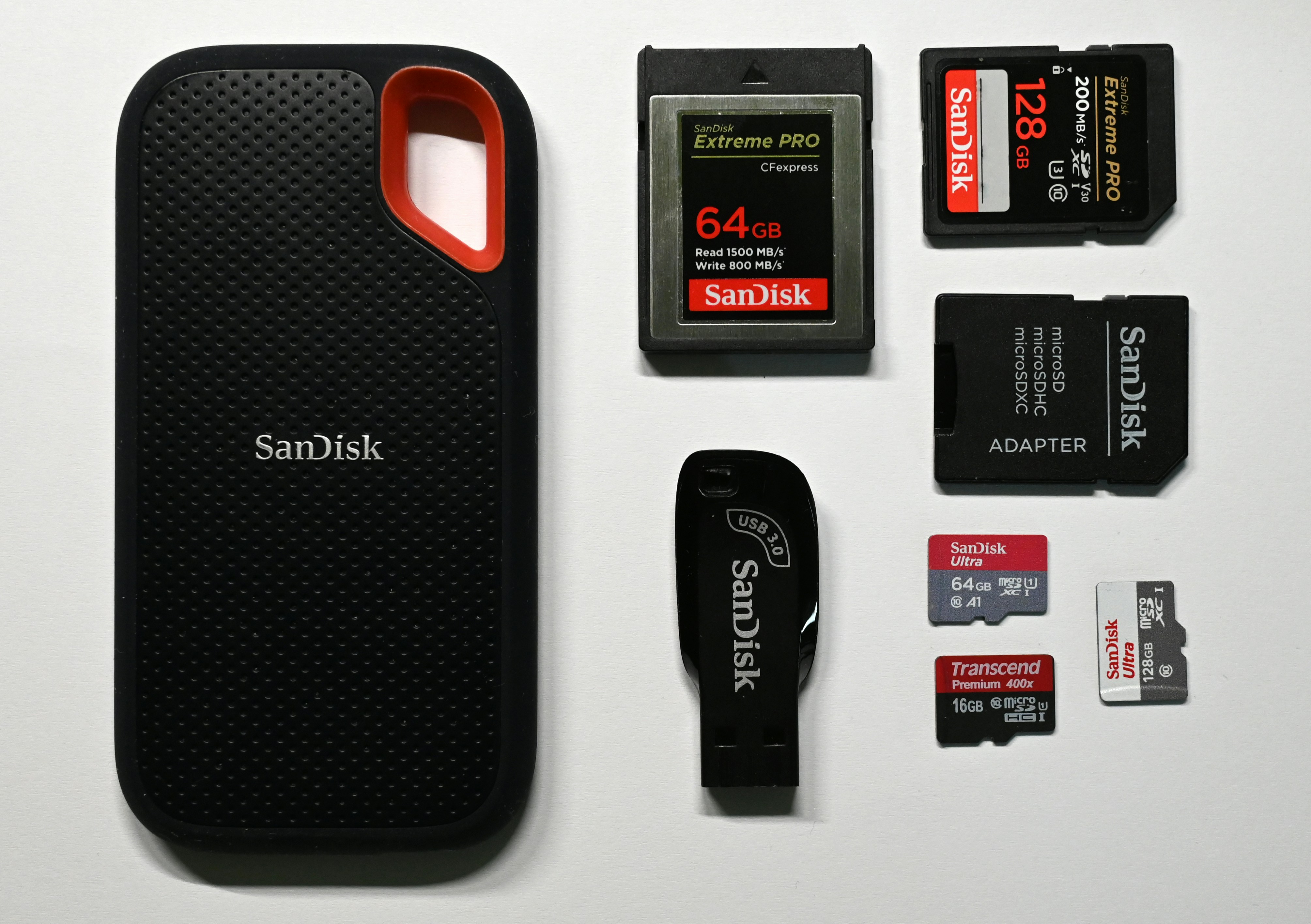
External storage devices, on the other hand, serve as supplementary storage options, allowing users to expand their storage capacities or back up important data. Examples include USB flash drives, external hard drives, and optical discs like CDs, DVDs, and Blu-ray discs. USB flash drives are portable and offer quick access, suitable for transferring files between devices. External hard drives, often featuring large capacities, are ideal for backing up data due to their reliability. Optical discs, while less common in modern usage, still serve specific roles, such as media distribution and archival storage.
Each type of storage device has distinct advantages and is suited for various applications, making it essential for users to understand their options to choose the right storage solution for their needs.
How Storage Devices Work
The operation of storage devices revolves around the essential principles of data writing and reading, which are crucial for the functionality of modern computing. Primarily, storage devices can be categorized based on the technology they employ, which includes magnetic, optical, and flash memory systems. Each type of storage device has its distinct method of reading and writing data.
Magnetic storage devices, such as hard disk drives (HDDs), function through the utilization of magnetic fields. Data is written to these devices by altering the magnetization of tiny segments on a magnetic surface, using a write head that moves over the disk as it spins. When reading data, this head detects the magnetization of these segments, translating it back into recognizable information. This method is relatively economical and allows for substantial storage capacities, making it a popular choice for mass data storage.
Optical storage, including CDs, DVDs, and Blu-ray discs, operates utilizing lasers to encode data. In this technology, the writing process involves creating pits on the surface of the disc, which represent the data’s binary code. During playback, a laser reads these pits and lands, converting them into audio, video, or other types of data. While optical storage has become somewhat less dominant due to the emergence of more efficient technologies, it still offers a reliable means of data preservation.
Flash memory devices, found in USB flash drives and solid-state drives (SSDs), are based on electronic circuitry. They store data in memory cells that consist of floating-gate transistors. Unlike HDDs and optical discs, flash memory enables data access and erasure without moving parts, offering faster data retrieval and lower latency. This technology has experienced rapid advancements, impacting storage performance and reliability significantly.
Internal vs. External Storage
In the realm of storage devices, understanding the distinction between internal and external storage is crucial. Both types serve significant roles in data management but differ in several key aspects, including speed, accessibility, capacity, and typical use cases.
Internal storage, typically found within a computer or device, offers faster access speeds compared to external options. This is primarily due to its direct connection to the system’s motherboard, allowing for quicker data transfers and improved overall performance. Internal drives, such as solid-state drives (SSDs) and hard disk drives (HDDs), are essential for operating systems and software applications, contributing to optimal device functionality.
On the other hand, external storage devices, which include USB flash drives, external hard drives, and SSDs, provide a level of flexibility that internal devices cannot match. They are easily transportable, making it simple to back up and transfer data between multiple systems. This accessibility renders external storage ideal for users who require data mobility or need additional space without the hassle of installing hardware components inside a device.
Capacity is another important consideration. Internal storage often comes with a range of capacities, which are generally sufficient for most users. However, external storage devices can frequently offer significantly larger capacities. As digital content proliferates, such as high-resolution videos and large software applications, users are increasingly relying on external options to accommodate their storage needs.
In evaluating which storage option is more advantageous, it ultimately depends on the specific requirements of the user. For those prioritizing performance and speed, internal storage may be the best choice. Conversely, for individuals who prioritize flexibility and capacity, external storage solutions could prove to be more suitable.
Data Retention and Volatility
Data retention is a critical aspect of storage devices, delineating how data is maintained over time and the fundamental differences between various types of memory. Primarily, storage devices are categorized into two significant types based on their data retention capabilities: volatile and non-volatile memory. Volatile memory, such as Random Access Memory (RAM), loses its stored data when the power is turned off. This characteristic makes RAM ideal for temporary data storage while executing applications, but inadequate for long-term data preservation.
In contrast, storage devices, such as Hard Disk Drives (HDDs), Solid State Drives (SSDs), and flash drives, are primarily classified as non-volatile memory. Non-volatile memory technology ensures that data remains intact and retrievable even when the device is powered down. This feature is crucial for users who rely on these devices to store important files, applications, and operating systems, providing a reliable method to preserve information across sessions. The various technologies employed in non-volatile storage help achieve data retention, which can range from years to decades depending on the device’s design and usage.
The significance of non-volatile memory cannot be overstated, especially in today’s data-driven environments where the ability to securely store and quickly access information is paramount. Technologies such as NAND flash memory and magnetic storage each present unique methodologies for data retention and retrieval. NAND flash memory, for instance, utilizes charge traps to hold data, whereas magnetic storage employs magnetic fields. These distinctions not only impact performance but also enhance the reliability and longevity of the devices containing these technologies.
Storage Capacity and Performance
Storage capacity is a critical aspect of understanding storage devices, as it defines how much data can be stored and retrieved effectively. It is typically measured in bytes, with common units including kilobytes (KB), megabytes (MB), gigabytes (GB), and terabytes (TB). As technology has progressed, the capacity of storage devices has expanded significantly to accommodate the increasing volume of data being generated in various fields, from enterprise applications to personal use.
The evolution of storage technologies has led to the development of high-capacity devices such as solid-state drives (SSDs) and cloud storage solutions, which allow for the storage of vast amounts of information. For example, modern SSDs can offer capacities of several terabytes, while cloud-based solutions can scale to hold petabytes of data, thereby meeting the diverse needs of users.
In addition to storage capacity, performance remains a key consideration when evaluating storage devices. Performance encompasses several parameters, including data transfer rates and access speed. Data transfer rates, typically measured in megabytes per second (MB/s) or gigabytes per second (GB/s), indicate how quickly data can be read from or written to the storage device. High-speed storage devices such as NVMe SSDs often outperform traditional hard disk drives (HDDs) by a significant margin, ensuring faster system responses and improved efficiency in tasks.
Moreover, the speed of accessing data from storage is influenced by the technology used in the devices. For instance, SSDs, which utilize flash technology, provide quicker access times compared to HDDs, which rely on mechanical components. These advancements in both storage capacity and performance highlight the importance of selecting appropriate storage solutions to meet the demands of modern applications.
Common Storage Devices and Their Uses
Storage devices are crucial components in modern computing, enabling users to save and access data efficiently. Among the most common types of storage devices are Hard Disk Drives (HDDs), Solid State Drives (SSDs), USB drives, and optical storage media like CD/DVD/Blu-ray discs. Each of these devices serves unique purposes, catering to different user needs.
Hard Disk Drives (HDDs) are traditional storage devices that utilize spinning disks to read and write data. Due to their relatively low cost, they are often used in personal computers and large-data applications. Users requiring substantial storage capacity, such as businesses managing large databases or multimedia files, often favor HDDs for their affordability and high storage limits.
In contrast, Solid State Drives (SSDs) offer a more advanced technology, using flash memory to store data, which results in faster read and write speeds. This speed makes SSDs particularly appealing to gamers and professionals engaged in graphic design or video editing, where performance is paramount. While they tend to be more expensive than HDDs, their durability and efficiency render them worth the investment for users who prioritize performance.
USB drives, also known as thumb drives, provide portable storage solutions that are widely used for transferring files between computers. Their compact size and increasing storage capacities make them ideal for students and professionals needing to carry important documents or presentations. On the other hand, optical media such as CD/DVD/Blu-ray discs, while less common in the digital age, are still utilized for archiving data, distributing software, and enjoying movies, as they provide a physical medium for storage that can be easily shared.
In summary, the variety of storage devices available—ranging from HDDs and SSDs to USB drives and optical discs—ensure that individuals and organizations can find suitable solutions tailored to their needs. Understanding the strengths and limitations of each type is essential for making informed choices regarding data storage.
Future Trends in Storage Technology
The landscape of storage technology is continuously evolving, influenced by burgeoning data demands and innovations that aim to offer enhanced efficiency and reliability. As businesses and consumers increasingly depend on data, understanding future trends becomes essential. One significant trend is the rise of cloud storage solutions, which are becoming more sophisticated and integral to both personal and business data management. The cloud offers scalability, contributing to the seamless integration of various storage types. This scalability is not only cost-effective but also ensures accessible data anywhere, a vital feature in our mobile-driven world.
Advancements in storage capacity are also noteworthy. Innovations such as multi-level cell (MLC) and triple-level cell (TLC) technologies in NAND flash memory are enhancing storage densities. These developments allow for larger capacities in smaller form factors, addressing the need for portable yet high-capacity storage solutions. Additionally, the emergence of new materials, like phase-change memory (PCM), holds promise for even greater storage capacities and speeds, pushing traditional limits.
Moreover, the exploration of artificial intelligence (AI) in data management is paving the way for intelligent storage systems. Through AI, devices can optimize data organization and retrieval, enhancing both speed and reliability. Organizations can anticipate storage needs and maneuver more efficiently amidst fluctuating data landscapes. With the integration of such technologies, storage devices will not just store data; they will evolve into smart solutions that anticipate user requirements and enhance overall operations.
In conclusion, the future of storage technology is bright, with cloud solutions, increased capacities, and AI-driven management leading the way. These trends underscore the importance of staying informed and adaptable to leverage the full potential of emerging storage innovations.
Conclusion and Final Thoughts
Throughout this blog post, we have explored various types of storage devices, their underlying technologies, and their significance in contemporary computing. As digital data continues to proliferate, understanding the characteristics and functionalities of storage options is crucial for individuals and organizations alike. From hard disk drives (HDDs) to solid-state drives (SSDs) and cloud storage solutions, each type of storage device offers distinct advantages and limitations that cater to specific needs.
We highlighted the importance of choosing the right storage device based on factors such as performance, capacity, durability, and cost. For instance, SSDs are recognized for their superior speed and reliability, making them an ideal choice for applications requiring rapid data access. Conversely, HDDs provide larger storage capacities at a lower price point, which may be suitable for bulk data storage without immediate access needs. Additionally, cloud storage has emerged as a flexible solution, enabling users to store data off-site while accessing it from various devices, a particular advantage in remote work and collaboration.
Moreover, the evolution of storage technology plays a pivotal role in enhancing user experience and meeting the increasing demands for data storage. Emerging technologies such as NVMe and 3D NAND promise to further improve performance and capacity, indicating that storage solutions will continue to advance. As users evaluate their options, awareness of these trends and an understanding of individual requirements will guide them towards making informed decisions regarding storage solutions.
Ultimately, selecting the right storage device is not merely a technical choice; it impacts overall productivity, data security, and efficiency in managing digital information. Engaging with the nuances of various storage technologies can empower users to optimize their workflows and harness the full potential of their computing environments, highlighting the indispensable role of storage devices in our digital age.