What is a Router?
A router is a fundamental networking device that serves as a gateway, enabling communication between multiple devices connected to a home or office network. Its primary function is to connect various hardware, such as computers, smartphones, tablets, and printers, facilitating their ability to share data and access the internet. A router operates by forwarding data packets between devices through an established communication protocol, ensuring that messages are sent to the correct destinations.
In essence, a router manages the data traffic on a network, directing packets of information using routing tables that determine the best path for data transmission. Routers can either be hardware devices or software applications, but most commonly, they take the form of dedicated hardware devices installed within a local area network (LAN). When configured properly, routers provide not only data connectivity but also security features, such as firewalls and filters that protect networks from unauthorized access.
Moreover, modern routers are equipped with wireless capabilities, allowing devices to connect to the network without the need for wired connections. This wireless functionality enables the seamless connectivity of various devices, which is increasingly important in today’s mobile and digital world. Routers also play a crucial role in maintaining network performance, as they can manage bandwidth allocation among connected devices, ensuring optimal speed and efficiency.
Overall, understanding routers is essential for maintaining a robust network environment in both residential and professional settings. The ability to facilitate internal and external communications makes routers the heart of any network, highlighting their importance in modern connectivity.
How Routers Work
Routers serve as the pivotal components in home networks, managing data traffic and ensuring devices communicate effectively. A router’s primary function is to facilitate the forwarding of data packets between different networks. When a device, such as a smartphone or computer, sends information, the router receives these packets and determines the optimal path for them to reach the recipient device. This process of packet switching is fundamental for efficient network operation, allowing multiple devices to share bandwidth without causing significant delays.
Another critical function of routers is IP addressing. Each device on a network is assigned a unique Internet Protocol (IP) address, which acts as its identifier on the network. The router keeps a table of these IP addresses and manages their allocation through Dynamic Host Configuration Protocol (DHCP). By ensuring each device has a distinct address, the router facilitates direct communication between devices on the same network, as well as with external networks, such as the Internet.
Furthermore, routers employ various protocols to ensure effective data transfer. The Transmission Control Protocol (TCP), for instance, ensures that data packets are sent and received in sequence and without errors, thereby maintaining the integrity of the communication. Similarly, the Internet Control Message Protocol (ICMP) helps in diagnostic functions, allowing routers to manage and report errors in packet transmission. All these functions collectively enhance a router’s ability to maintain fast, reliable, and secure communication within the home network, making it an essential element for any connected household.
Types of Routers
Routers play a pivotal role in creating and managing networks, providing a pathway for data packets to travel between devices. As technology has evolved, various types of routers have emerged to cater to the diverse needs of users. Understanding these different categories can significantly aid in selecting the right router for your environment.
One of the most common types is the wired router. As its name suggests, this router utilizes physical cables to connect devices within a local area network (LAN). Wired routers typically offer higher speeds and better security, making them ideal for environments where stable, high-speed internet connections are paramount, such as in a business setting.
On the other hand, wireless routers have gained immense popularity due to their convenience and ease of use. These routers transmit data over Wi-Fi, allowing multiple devices to connect without the constraints of cables. This makes them particularly suitable for home networks where mobile devices like smartphones and tablets are prevalent.
Another category to consider is the edge router, which serves as a gateway between a local area network and external networks, typically the internet. Edge routers are essential for managing data traffic and ensuring that the outgoing and incoming data packets are correctly routed to their desired destinations.
Finally, core routers are designed for service providers and large enterprises. Operating within the backbone of the network, core routers facilitate the transfer of data between different networks, optimizing performance and ensuring high-capacity transmissions.
By understanding the distinct functions and use cases for each type of router, users can make informed decisions to meet their specific networking needs.
Router Features to Consider
When selecting a router for your home network, it is essential to evaluate various features to ensure optimal performance and security. One primary aspect to consider is the speed of the router, typically measured in megabits per second (Mbps). Higher speed ratings are beneficial for households with multiple users engaging in bandwidth-intensive activities such as gaming, streaming, or video conferencing. A router with dual-band capabilities can further enhance performance by providing both 2.4 GHz and 5 GHz bands, allowing devices to connect to the most suitable frequency.
Range, or the coverage area of the router, is another critical feature. A router’s range determines how far its signal reaches, impacting connectivity in larger homes or multi-story buildings. Wi-Fi extenders or mesh networking solutions may be necessary for extensive coverage, whereas a more compact living space might be adequately served by a standard router. When assessing range, look for routers equipped with advanced antenna technology to improve signal distribution.
Security is paramount when considering router features. Look for routers that support modern encryption standards, such as WPA3, to protect your network from unauthorized access and potential cyber threats. Additional security features might include built-in firewalls, security updates, and guest networks, which allow visitors to access the internet without exposing your main network.
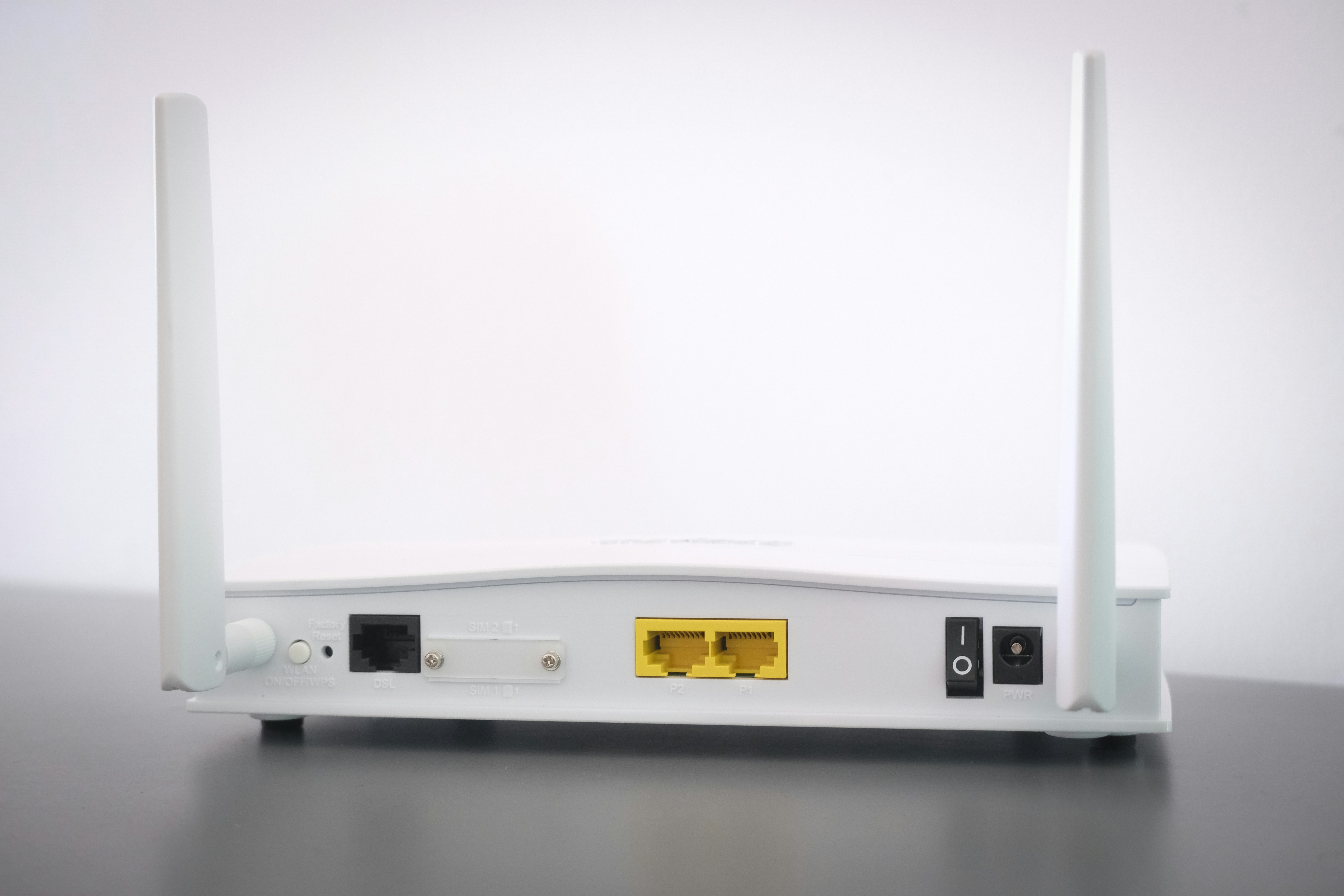
Another crucial aspect is the number of ports available for wired connections. A router should offer multiple Ethernet ports to connect devices directly, enhancing speed and reliability. This is particularly important for devices that require stable internet connections, such as gaming consoles or desktop computers. Overall, when choosing a router, prioritize speed, range, security, and connectivity options to ensure a robust home network.
Setting Up a Home Router
Setting up a home router is a crucial step in establishing a reliable network for internet access. This process can be straightforward if followed step by step, making it manageable even for those who may not be particularly tech-savvy.
First, physically connect your router to your modem. Begin by plugging one end of an Ethernet cable into the modem and the other end into the WAN or Internet port on your router. Next, connect the router to a power source using the supplied adapter. Most routers have LED indicators that will light up to indicate power. Wait for the power light to become stable before proceeding.
Once powered on, use another Ethernet cable to connect your computer to one of the router’s LAN ports. Alternatively, you can connect wirelessly if the router supports it. To configure the router, you will need to access its web-based interface. Open a web browser and enter the router’s default IP address, often found on a sticker on the device. Common IP addresses include “192.168.1.1” or “192.168.0.1.” You will be prompted to enter a username and password, which can also be found in the router’s documentation or on the sticker.
After logging in, begin by configuring your internet connection settings. This may involve selecting the type of connection your internet service provider (ISP) uses, such as DHCP or PPPoE. Next, it is essential to secure your network by changing the default router password and enabling WPA3 encryption for your Wi-Fi network. Choose a strong passphrase to enhance security, ensuring that your home network remains protected from unauthorized access.
Lastly, save the settings and disconnect from the Ethernet cable if you’re connected via wire. You can now connect devices wirelessly using the newly configured Wi-Fi name and password. This simple setup process enables you to establish a robust home network tailored to your needs.
Common Issues with Routers
Routers play a vital role in maintaining a seamless home network, yet users often face various issues that can hamper connectivity and performance. One of the most common problems experienced with routers is connectivity issues. These can manifest as the inability to connect to the Wi-Fi network or being intermittently disconnected. Such connectivity problems are frequently resolved by rebooting the router or ensuring that the firmware is up-to-date. Additionally, users should check for interference from other electronic devices, as these can disrupt the wireless signal.
Another frequent concern is slow internet speeds, which can arise from several factors, including an overloaded network, outdated hardware, or inadequate bandwidth from the internet service provider. To troubleshoot slow speeds, users can start by running a speed test to determine if the speeds match what is provided by their ISP. If discrepancies are found, restarting the router, reconnecting devices, and minimizing the number of devices on the network can help improve performance. Furthermore, within the router settings, users can prioritize certain devices, ensuring that bandwidth is allocated efficiently.
Frequent disconnections are an annoyance many users encounter with their routers. This issue can be attributed to weak signals, physical obstructions, or router malfunctions. Placing routers in central locations can help diminish weak signal areas within a home, and ensuring that firmware is updated can prevent unexpected disconnections. If the problems persist, it may be beneficial to reset the router to factory settings or consider replacing older hardware. Understanding these common issues and the corresponding solutions not only enhances the user experience but also ensures a stable and robust home network.
The Importance of Router Security
In today’s interconnected world, ensuring the security of your router is paramount to safeguard your home network from unauthorized access and potential cyber threats. A router serves as the gateway to the internet for all devices within a network, which makes it a prime target for cybercriminals. By implementing robust security measures, you can significantly reduce the risk of data breaches or unwanted intrusions.
One of the first steps in securing your router is to change the default password that comes preconfigured with the device. Many routers have easily guessable default passwords, making it simple for attackers to gain access. Choose a strong, unique password that combines letters, numbers, and special characters to fortify your router’s defenses. Regularly updating this password is also advisable to maintain security.
Another critical aspect of router security is the activation of firewalls. Most modern routers come with built-in firewall protection that helps monitor and control incoming and outgoing network traffic. Ensuring that your firewall is enabled is a fundamental step in preventing unauthorized access. Depending on your router’s settings, you may also consider implementing additional measures such as enabling network address translation (NAT), which can further obfuscate your internal network from external threats.
Moreover, keeping your router’s firmware updated is essential for reinforcing security. Router manufacturers often release firmware updates that patch vulnerabilities and enhance performance. Regularly checking for and applying these updates ensures that your router is equipped with the latest security features.
In conclusion, taking proactive steps to secure your router is crucial in protecting your home network. By changing default passwords, enabling firewalls, and keeping firmware up to date, you can create a much safer digital environment for all connected devices.
Future Developments in Router Technology
As technology continues to advance, router technology is evolving rapidly to meet the demands of modern internet usage. One of the most significant developments in this realm is the emergence of Wi-Fi 6, also known as 802.11ax. This latest standard offers enhanced speed, efficiency, and performance, enabling routers to support more devices simultaneously without diminishing the quality of the connection. With the increase in smart home devices and online streaming, Wi-Fi 6 is poised to be a game changer for households, allowing for smoother operation and reduced lag.
Another noteworthy trend is the rise of mesh networking systems. Traditional routers often struggle with coverage in larger homes or spaces with multiple floors. Mesh systems consist of multiple nodes that work collaboratively to provide a seamless and extensive wireless network. This setup enables users to eliminate dead zones and enjoy consistent internet access throughout their homes, making it an attractive option for users looking to improve their connectivity.
Additionally, advancements in speed and range are becoming increasingly evident as manufacturers focus on delivering high-performance routers that can cater to the growing demands of bandwidth-intensive applications. Technology such as Multi-User, Multiple Input, Multiple Output (MU-MIMO) allows routers to communicate with several devices at once, enhancing overall network performance. Furthermore, improvements in antenna design and beamforming technology ensure optimal signal strength and coverage.
These developments in router technology not only signify an enhancement in the user experience but also pave the way for future innovations. With trends such as improved energy efficiency and potential integration with emerging technologies like 5G, users can expect routers to become even more integral to their daily lives, ensuring a robust and responsive home network environment.
Conclusion: Choosing the Right Router for Your Needs
In the modern digital age, selecting the appropriate router is crucial, as it serves as the backbone of your home network. With the vast array of options available, it is important to understand your specific requirements. Factors such as the size of your home, the number of devices connected, and the types of online activities you engage in should guide your decision-making process.
For instance, those living in larger homes may require a router with a broader range and higher performance capabilities to ensure connectivity throughout the premises. Conversely, users with minimal connectivity needs may find a basic model sufficient for their requirements. Moreover, advanced users who engage in activities like gaming or streaming in high definition will benefit from investing in routers that support higher speeds and prioritize bandwidth for specific applications.
Furthermore, security features should not be overlooked. As cyber threats continue to evolve, choosing a router with robust security protocols can provide peace of mind for you and your family. Many modern routers come equipped with built-in technologies to safeguard your network, which is worth considering in your selection process.
Before making a purchase, it is advisable to assess the specifications and functionalities of various models in relation to your needs. Reading reviews and seeking recommendations can also provide valuable insights into performance and user satisfaction. Ultimately, the right router will not only enhance your internet experience but also support the seamless integration of smart devices within your home.