Introduction to the 101-Key Keyboard
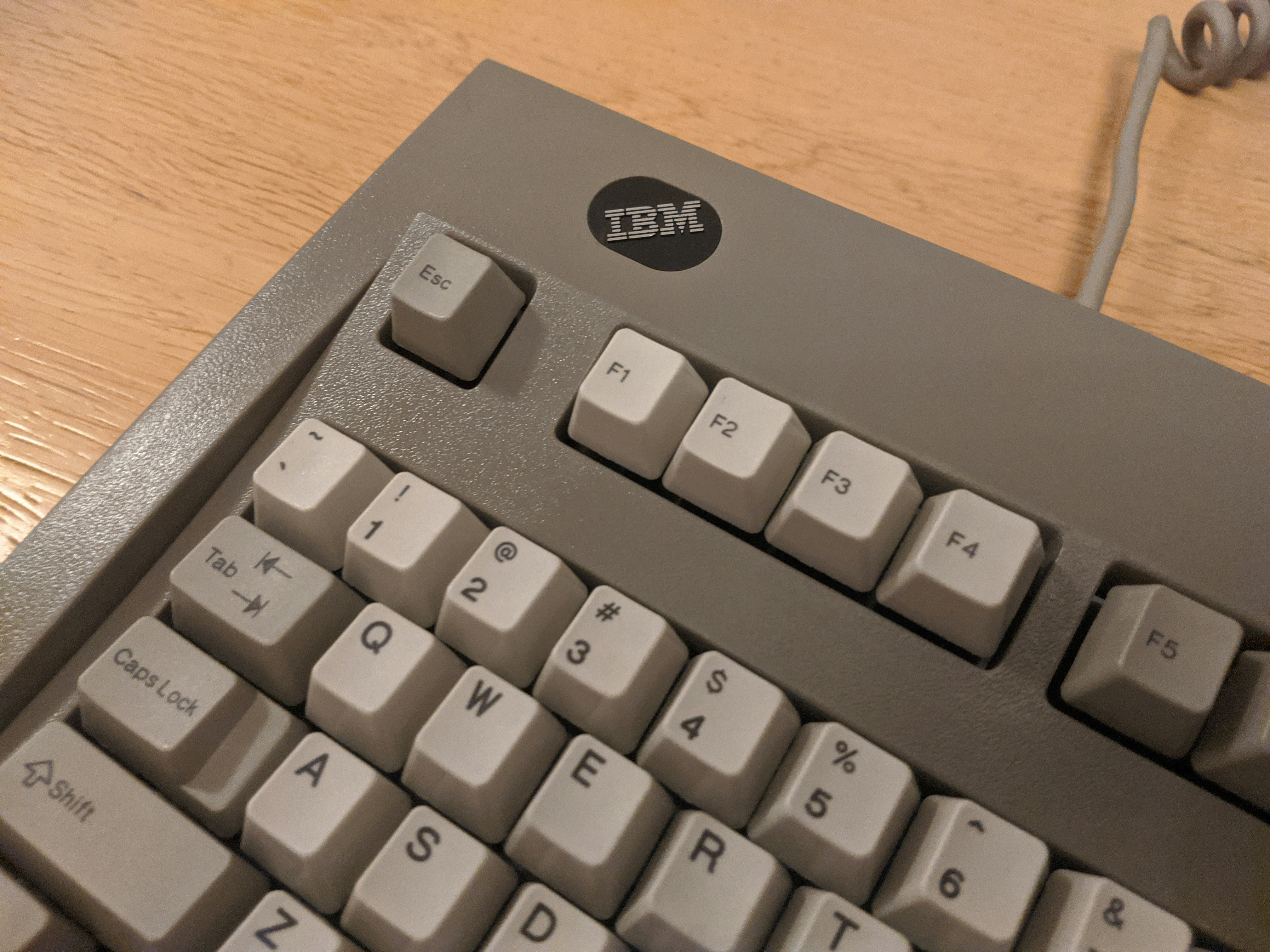
The 101-key keyboard, originally designed by IBM for the IBM PC/AT in 1984, marks a pivotal moment in the evolution of computer peripherals. This keyboard layout set a precedent that has endured over decades, influencing not only the design of future keyboards but also the overall user experience with personal computers. With its comprehensive set of keys, the 101-key keyboard was engineered to provide enhanced functionality and ergonomics, catering to both casual users and professionals alike.
One defining characteristic of the 101-key keyboard is its inclusion of dedicated function keys, a numeric keypad, and additional control keys. This design facilitated a broader range of commands and shortcuts, thereby accelerating productivity for users engaged in various computing tasks. Furthermore, the arrangement of keys on this keyboard, including the iconic “Enter” and “Backspace” keys, has become a standard that continues to influence modern keyboard layouts.
The significance of the 101-key keyboard extends beyond its physical design; it represents a historical benchmark in the development of computing technology. As computers transitioned from complex machinery to user-friendly devices, the 101-key layout allowed for a greater degree of interaction between man and machine. The feedback received from early users led to refinements in layout and functionality, paving the way for subsequent generations of keyboards.
Moreover, the 101-key keyboard established a universal standard that manufacturers would adopt globally, ensuring compatibility across a wide range of devices. This has reinforced its legacy as a foundational element in computing history. Even in an era where technology has advanced significantly, the principles behind the 101-key keyboard continue to resonate, as many contemporary keyboards still retain elements of this classic design.
History and Evolution of Computer Keyboards
The evolution of computer keyboards is a fascinating journey that reflects advancements in technology and user needs. The earliest keyboards emerged from the typewriters of the late 19th century, which were mechanical devices that utilized a series of levers to create printed text. These early designs laid the foundation for modern typing devices.
With the introduction of electronic computers in the mid-20th century, the necessity for a more versatile input device became apparent. In the early years of computing, keyboards often had limited layouts with fewer keys, primarily designed for function-specific tasks. However, as computing capabilities expanded, the demand for more keys and functionalities grew, leading to the innovation of new keyboard designs.
One significant evolution in keyboard design was the transition from the traditional typewriter layout to a more functional electronic layout. This shift enabled the addition of special keys, such as function keys and multimedia controls, which catered to the needs of more sophisticated software applications. Moreover, as computers became more user-friendly, the necessity for additional keys also became evident, culminating in the development of the enhanced keyboard.
The enhanced keyboard is characterized by the inclusion of an extended set of keys, often totaling 101 or more. This redesign facilitated better user interaction with operating systems and applications by providing dedicated keys for commands like cut, copy, paste, and other functions. The 101-key layout specifically targeted both PC and Mac users, becoming a standard in keyboard design, owing to its versatility and ergonomic enhancements.
In using the 101-key keyboard, users have come to appreciate not only the functionality it provides but also its rich history rooted in the continuous need for improved technology and usability. Each advancement in keyboard design has contributed to the overall legacy of computer input devices that continue to evolve with the times.
Key Features of the 101-Key Keyboard
The 101-key keyboard is renowned for its distinctive layout and comprehensive feature set, making it a staple in both professional and personal computing environments. With its combination of standard keys and additional function keys, the 101-key layout offers users a versatile typing experience that enhances productivity. One of the most notable aspects of this keyboard is its inclusion of additional dedicated keys, such as the numeric keypad. This feature particularly benefits users who require frequent numerical input, such as data entry professionals and accountants.
In terms of ergonomic design, the 101-key keyboard presents characteristics aimed at improving user comfort. Many modern versions of this keyboard include features like wrist rests, adjustable tilt angles, and contoured key arrangements. These elements not only minimize strain during prolonged use but also provide an intuitive typing environment that can contribute to overall workflow efficiency.
Moreover, the keyboard’s function keys, which typically operate as shortcuts for various tasks, enhance the user’s ability to navigate software applications swiftly. The placement of these keys in a row above the primary alphanumeric keys allows for quick access, streamlining commands for tasks such as adjusting volume, launching applications, or executing specific software functions. By incorporating these features, the 101-key keyboard caters to diverse user needs while ensuring ease of operation.
While traditional typists may appreciate the familiar layout of the 101-key design, those in specialized fields can also leverage its extended functionalities. The combination of key diversity, ergonomic considerations, and user-centric features makes the 101-key keyboard a preferred choice among many individuals seeking a balance of efficiency and comfort. Its legacy as a premium input device continues to influence contemporary keyboard designs, solidifying its position in the history of computer accessories.
Comparison: 101-Key Keyboard vs. Enhanced Keyboard
The 101-key keyboard and the enhanced keyboard are two popular options that cater to different user preferences and needs. Understanding the distinctions between these keyboard types is essential for consumers who seek optimal performance in their computing tasks. One of the most significant differences lies in the key layout. The 101-key keyboard typically follows a standard layout, which includes essential keys and a basic function row. In contrast, the enhanced keyboard incorporates additional keys and a multimedia feature set, allowing for more streamlined workflows and improved productivity.
Another key aspect to consider is tactile feedback. The 101-key keyboard often features a more traditional tactile response, which many typists prefer for its straightforward interaction. Enhanced keyboards, however, may offer a variety of key switches, including mechanical and membrane options, each designed to provide differing levels of tactile feedback. This variability means that users can select a keyboard that aligns with their typing preferences, whether they lean towards a softer touch or a more pronounced click sound.
Additionally, keycap design plays a crucial role in the usability and aesthetic appeal of both keyboard types. The keycaps on a 101-key keyboard typically adhere to a uniform shape and profile, while enhanced keyboards may experiment with various shapes and materials. For instance, some enhanced keyboards use sculpted keycaps to improve ergonomics and typing comfort during extended use. Moreover, customizable keycap options are prevalent among enhanced keyboards, allowing users to modify their keyboards for personalization and enhanced functionality.
In conclusion, selecting between a 101-key keyboard and an enhanced keyboard involves careful consideration of layout, tactile feedback, and keycap design. By understanding these distinctions, consumers can make informed choices that best suit their typing habits and computing needs.
Typing Experience and Tactile Feedback
The 101-key keyboard offers a distinctive typing experience that is characterized by its responsiveness and tactile feedback. A well-designed keyboard not only facilitates accurate keystrokes but also enhances user comfort during prolonged usage. One of the critical elements contributing to this typing experience is the switch mechanism utilized in the keyboard. Traditional mechanical switches, for instance, are favored for their pronounced tactile feedback, which allows users to feel each key press distinctly. This initial tactile response can significantly reduce typing errors and boost overall typing speed, making it a preferred choice for both professional typists and casual users.
In contrast, membrane keyboards, though often quieter, may lack the satisfying tactile sensation that many users desire. The overall feel of a keyboard becomes particularly important when considering extensive typing tasks, such as programming, writing, or data entry. The 101-key keyboard, with its standard configuration, aligns with the expectations of users who seek a blend of comfort and functionality. The layout is carefully curated to reduce finger strain, allowing for a more engaging typing experience.
Furthermore, the keycap design also plays a pivotal role in delivering a superior typing experience. Keycaps that are sculpted to fit the natural curvature of fingers can enhance the perceived comfort, promoting a more ergonomic approach to typing. Some users even opt for aftermarket keycaps designed with unique textures or colors, which can further personalize and improve the tactile feedback of their keyboards. Overall, the 101-key keyboard is engineered to provide a satisfying tactile response and an enjoyable typing experience, ensuring that users can engage in prolonged keyboard activities without discomfort.
Technological Impact and Legacy
The 101-key keyboard stands as a significant milestone in the evolution of typing technology, marking a transition from earlier keyboard models to more advanced designs. Introduced primarily in the late 1980s, this keyboard format not only standardized the layout of keys but also introduced features that have become fundamental in modern computing. Its legacy can be traced in various keyboard designs, influencing everything from the shape and placement of keys to the incorporation of additional functionalities.
One major impact of the 101-key keyboard is the introduction of dedicated function keys, allowing users to perform tasks more efficiently without relying solely on mouse navigation. The functionality provided by these keys paved the way for the graphical user interfaces we have today, where keyboard shortcuts significantly enhance workflow productivity. Furthermore, the addition of a numeric keypad enabled users to perform data entry tasks with increased speed and accuracy, a feature that is now standard in many keyboards.
Moreover, the 101-key layout has set a template for both mechanical and membrane keyboards, steering digital typists toward ergonomic considerations. By emphasizing a clear distinction between the alphanumeric keys and functionality keys, it allowed for a more intuitive typing experience. The design encouraged the creation of keyboards that provide tactile feedback and customizable features, catering to both casual users and professional typists alike. This focus on user accessibility and comfort has been an essential factor in broadening keyboard design into various markets, ranging from gaming to office use.
In conclusion, the 101-key keyboard’s contribution to typing technology cannot be overstated. Its influence on modern keyboards can still be felt across diverse applications, with its principles of design and functionality continuing to shape how we interact with computers today.
Modern Variations of the 101-Key Layout
The evolution of the 101-key layout has led to numerous modern variations that retain the core essence while introducing innovative features. Contemporary keyboards, especially in the realm of mechanical models, have adapted the classic design to accommodate the changing needs of users, whether they are gamers, typists, or casual users.
One notable adaptation is the introduction of compact keyboards that preserve the functionality of the 101-key layout while reducing the overall size. These keyboards often incorporate the standard keys in a condensed format, eliminating the number pad to allow for greater portability. This variant appeals particularly to laptop users and those with limited desk space, emphasizing the importance of versatility in today’s computing environment.
Additionally, many modern 101-key keyboards now feature programmable keys and macros, allowing users to customize their typing experience according to their unique preferences. These enhancements enable faster access to frequently used commands, improving efficiency and productivity in both professional and recreational settings. Moreover, the integration of RGB backlighting has become a popular trend, adding a visually appealing element and allowing users to personalize their devices further.
Another trend is the use of materials and construction techniques that enhance durability and typing comfort. Manufacturers are increasingly focusing on ergonomics, providing keyboards with adjustable heights, wrist support, and key switches that offer varying tactile feedback. Some modern variations even incorporate wireless technology, giving users the freedom to choose between wired and wireless setups, enhancing convenience and reducing clutter.
As a result, the modern variations of the 101-key layout demonstrate a commitment to retaining the foundational design while embracing advancements that cater to the diverse preferences of users. The continuous innovation within this framework underscores the enduring legacy of the 101-key layout in the ever-evolving technology landscape.
Choosing the Right Keyboard for Your Needs
When it comes to selecting a keyboard, particularly one based on the classic 101-key design, understanding your individual usage patterns and preferences is essential. Different users, such as typists, gamers, and programmers, will have distinct requirements that influence their choice of keyboard. One vital aspect to consider is the type of switch technology that best suits your typing style. Mechanical keyboards are well-regarded for their tactile feedback and durability, making them a popular choice among gamers and those who type extensively. In contrast, membrane keyboards tend to be quieter and are often more affordable, which can be advantageous for casual users.
Another factor to take into account is ergonomics. Keyboards designed with ergonomic principles can significantly reduce strain over long typing sessions. Look for adjustable height settings and wrist support features, especially if you suffer from discomfort or fatigue during extended use. Additionally, the layout and design of a keyboard should cater to personal preferences; for instance, some users may prefer compact layouts while others may appreciate full-sized keyboards with numeric keypads for efficient data entry.
Compatibility is another critical consideration, particularly if you frequently switch between devices. Ensure that your keyboard supports multiple platforms, such as Windows, macOS, and even mobile devices if needed. Lastly, features such as customizable keys, backlighting options, and programmable macros can enhance your overall keyboard experience. By carefully evaluating your primary uses, typing habits, and desired features, you can select a 101-key or alternative keyboard that meets your specific needs, ensuring both comfort and efficiency in your day-to-day tasks.
Conclusion and Future of Keyboard Design
The 101-key keyboard has played a significant role in shaping modern computing. Its design, which balances functionality and user experience, caters to a wide range of typing needs, making it a preferred choice for both casual users and professionals. Over the years, this keyboard layout has not only streamlined communication but also enhanced productivity, proving its versatility across various applications.
As technology continues to advance, keyboard design is likely to evolve significantly. Factors such as mobile computing, cloud-based applications, and the increasing use of artificial intelligence may influence the development of next-generation keyboards. Ergonomic considerations, wireless functionality, and customizable layouts are just a few elements that may become standard features in the keyboards of tomorrow. Furthermore, the rise of touchscreen interfaces and voice recognition technology could challenge the traditional keyboard design, prompting manufacturers to rethink what a keyboard can be.
It is also essential to consider the preferences of users as they will undoubtedly play a crucial role in dictating the features of future keyboards. Users may seek more personalized experiences, opting for keyboards that accommodate their specific typing habits, such as those requiring specialized keys for gaming or programming. This user-centric approach will likely inform the direction of keyboard innovation, leading to designs that prioritize both form and function.
In conclusion, the legacy of the 101-key keyboard is a testament to its enduring importance in the digital realm. As we look ahead, it will be fascinating to see how emerging technologies and user preferences shape the future of keyboard design, potentially providing tools that enhance our interaction with devices.