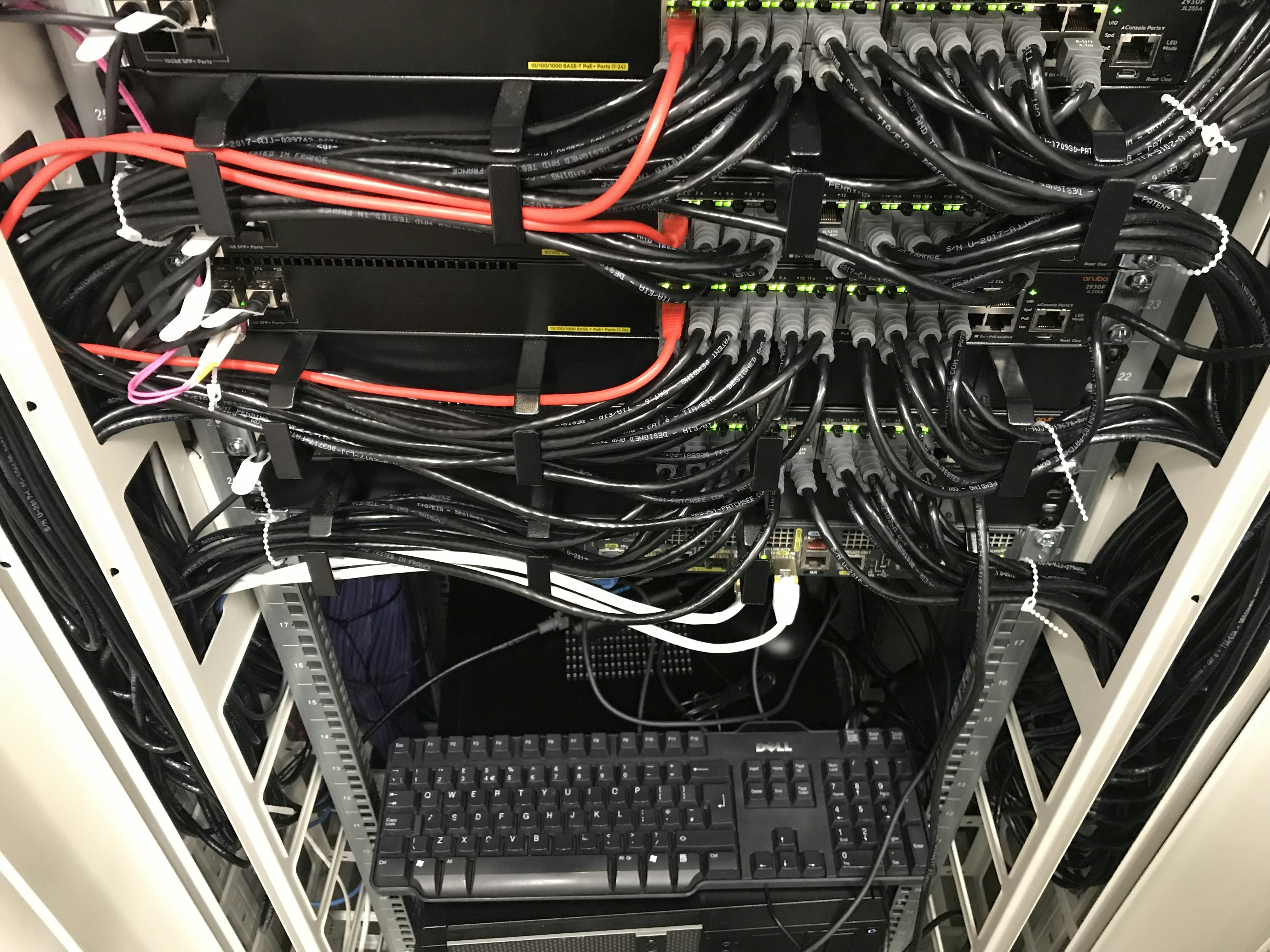
Understanding Local Area Networks
A Local Area Network (LAN) is a system that interconnects devices within a limited geographical area, such as a home, school, or office. Unlike Wide Area Networks (WANs), which can cover broader areas and are often managed by multiple organizations, LANs operate on a more localized scale. The importance of LANs cannot be overstated, as they serve as the backbone of connectivity in both home and educational environments. By facilitating communication between various devices—such as computers, printers, and smartphones—LANs enable users to access shared resources and services effectively.
In a typical home setup, a LAN allows family members to share internet connections, printers, and files with each other seamlessly. This local networking capability ensures that devices can communicate without needing to access external networks, thus enhancing speed and reliability. Schools utilize LANs to connect computers in classrooms, libraries, and administrative offices, allowing students and staff members to share resources, access educational materials, and collaborate on projects more efficiently.
The design of LANs generally allows for easy scalability. New devices can be added to the network without significant disruption, making it adaptable to changing needs. Furthermore, the networking protocols used in LANs, such as Ethernet and Wi-Fi, enable a variety of devices to connect regardless of their manufacturers, fostering a diverse environmental ecosystem.
Connecting devices within a LAN typically involves using switches and routers that manage traffic and ensure data packets reach their intended destinations. This internal communication fosters a collaborative atmosphere, whether at home or in educational settings, ultimately enhancing overall productivity and user experience. As we delve further into the specifics of LANs, it becomes evident that understanding their structure and functionality is crucial for harnessing their potential.
Components of a LAN
Local Area Networks (LANs) consist of several essential components that work cohesively to ensure connectivity and efficient data transfer within homes and schools. Key elements include routers, switches, access points, and network cables, each fulfilling a specific role in the network architecture.
The router serves as the central hub of a LAN. It connects different devices to the internet and facilitates communication between them. By managing IP addresses, the router ensures that data is routed to the correct destinations. Home and educational environments typically utilize wireless routers, which provide both wired and wireless connectivity, enhancing mobility within the network.
Switches are another critical component of LANs. They function by connecting multiple devices within the network, allowing them to communicate directly and manage data traffic efficiently. Unlike routers, switches operate at the data link layer and do not manage internet traffic, making them ideal for internal device connections. In both home and school networking, switches can make the connection of multiple computers, printers, and other devices seamless.
Access points expand the network’s reach by providing additional wireless connectivity options. They connect to the router and broadcast a wireless signal, allowing devices to connect to the network freely without being tethered by cables. This is especially useful in larger homes or schools where the main router’s signal may not adequately cover all areas.
Network cables, often Ethernet cables, are also fundamental to LANs, serving as the physical medium through which data is transmitted. These cables connect devices directly to switches or routers, ensuring stable and high-speed connectivity. Different categories of cables, such as Cat5e or Cat6, are commonly used, depending on the speed and bandwidth requirements of the network.
By integrating these components—routers, switches, access points, and network cables—users can establish robust LAN setups that support a variety of applications and connect multiple devices efficiently.
Types of Local Area Networks
Local Area Networks (LANs) can be broadly categorized into three main types: wired LANs, wireless LANs, and hybrid LANs. Each type has its distinct features, advantages, and disadvantages that influence their suitability for various environments such as homes or schools.
Wired LANs utilize physical cables—typically Ethernet cables—to connect devices. The primary advantage of wired LANs is their reliability; stability of connection and speed are generally superior when compared to wireless alternatives. Wired networks also tend to have lower latency, making them ideal for tasks that require uninterrupted data flow, such as video streaming or online gaming. However, the installation can be labor-intensive and less flexible since moving devices around requires additional cabling efforts. Additionally, wired LANs can have limitations in terms of mobility for users.
On the other hand, wireless LANs (WLANs) use radio waves to connect devices without needing physical wires. The notable advantage of wireless networks is their flexibility, allowing users to connect from various locations within a coverage area, thereby promoting mobility. This characteristic makes them particularly appealing for home users who require access to the internet while moving around the house. However, WLANs may face issues such as interference from other electronic devices and signal attenuation due to obstacles like walls, which can lead to inconsistent speeds and connectivity dropouts.
Lastly, hybrid LANs combine elements of both wired and wireless networks. This configuration capitalizes on the strengths of both types, often providing a more versatile solution. For instance, a school might use wired connections for stationary devices like computers in labs while implementing wireless access in common areas. However, managing a hybrid LAN requires careful planning and can lead to increased complexity due to the need for diverse hardware and configurations.
Setting Up a Home LAN
Setting up a Local Area Network (LAN) in a home environment is crucial for seamless connectivity among devices. This process begins with selecting the right equipment to suit your specific needs. A typical home LAN may involve a router, switches, and possibly a modem, depending on your Internet Service Provider (ISP). It is essential to choose a router that offers robust specifications, supporting the latest Wi-Fi standards (such as Wi-Fi 6), to ensure better speed and connectivity.
Once the appropriate equipment is obtained, the next step is to configure the router. By accessing the router’s administrative interface through a web browser, users can set up the network name (SSID) and password, enabling secure access. During this configuration, it is advisable to disable any unnecessary features and change default settings to enhance security. For additional layers of protection, consider enabling network encryption protocols such as WPA3.
After the configuration is complete, devices can be connected to the LAN. This can be achieved either through Ethernet cables for wired connections or via Wi-Fi for wireless devices. While wired connections generally provide faster and more stable internet access, Wi-Fi offers greater flexibility and convenience. Ensure all connected devices, including computers, laptops, smart TVs, and smart home devices, are correctly configured to communicate with the router.
Finally, it is essential to maintain a secure network environment. Regularly updating the router’s firmware will help to mitigate vulnerabilities, and periodically changing the password will prevent unauthorized access. Additionally, utilizing network monitoring tools can help track connected devices and identify potential security threats. By following these guidelines, you will create a reliable home LAN that supports your family’s online activities while ensuring a secure digital environment.
Creating a LAN for Schools
Establishing a Local Area Network (LAN) in educational settings demands careful consideration of the unique requirements that support both teaching and learning processes. In schools, providing robust internet access to multiple users is paramount, as students rely on connectivity for research, collaboration, and access to digital resources. A well-designed LAN can facilitate this by ensuring that all devices, whether desktops, laptops, or tablets, connect seamlessly to the network.
Managing bandwidth is essential to maintain optimal network performance, particularly during peak usage times when numerous devices are online simultaneously. Implementing Quality of Service (QoS) policies allows network administrators to prioritize essential educational applications and ensure equitable access for all users. Bandwidth throttling may also be necessary to manage non-educational activities that could be detrimental to overall network performance.
An increasingly important consideration for schools is the implementation of guest networks. These networks provide internet access for visitors, such as parents and guest speakers, without compromising the security of the primary LAN used by students and staff. By segregating guest access from the main network, schools can better protect sensitive data and maintain a safe online environment for students.
Ensuring online safety is critical within a school LAN. Firewall configurations, content filtering, and monitoring software can help to safeguard students from inappropriate content and potential cyber threats. Educating students about online safety practices should also be integrated into the curriculum, equipping them with knowledge to navigate the internet responsibly.
In conclusion, creating a LAN for schools involves addressing the unique connectivity needs of educational institutions, managing bandwidth effectively, implementing guest access, and prioritizing online safety. By focusing on these elements, schools can foster an environment that enhances both teaching and learning experiences through improved connectivity.
Network Security Concerns
In the realm of Local Area Networks (LAN), security is a paramount concern for both home and school environments. The increasing reliance on digital technologies has inevitably attracted a variety of security threats, jeopardizing sensitive information and network integrity. Common security risks include unauthorized access and malware infiltration, which can lead to devastating consequences such as data breaches, privacy violations, and disrupted network services.
Unauthorized access occurs when individuals gain entry to a network without permission, often resulting from weak security measures. This risk is exacerbated in environments where multiple devices are connected to the network, as each additional device represents a potential vulnerability. Subsequently, protecting a LAN against unauthorized access should involve implementing robust authentication protocols and utilizing strong, unique passwords for each user. Avoiding default passwords is essential, as they are widely known and easily exploited by malicious actors.
Malware, including viruses, worms, and spyware, poses another significant threat to the stability and security of a LAN. These malicious software programs can infiltrate networks through infected devices or phishing techniques, consequently compromising data and performance. To mitigate this risk, it is vital to employ comprehensive antivirus and anti-malware solutions that can detect and neutralize threats before they exploit network vulnerabilities.
Moreover, firewalls serve as a critical line of defense for LANs, acting as barriers that monitor and control incoming and outgoing network traffic based on predefined security rules. Implementing a firewall can significantly reduce the risk of unauthorized access and prevent malware from penetrating the network. Regularly updating software and firmware also plays a crucial role in maintaining security, as updates often contain patches for known vulnerabilities, thereby fortifying the LAN against emerging threats.
Troubleshooting Common LAN Issues
Local Area Networks (LANs) are integral to maintaining connectivity in both home and educational environments. However, users often encounter various issues that can impede network performance. Understanding common LAN problems and how to troubleshoot them effectively can enhance user experience and ensure stability.
One prevalent issue is connectivity problems, often manifested as devices failing to connect to the network or dropping connections intermittently. To address this, users should first check the physical connections, ensuring that cables are securely plugged in and free from damage. If utilizing Wi-Fi, verifying that the router is functional and within range is essential. Additionally, restarting the router can resolve many temporary connection issues by refreshing the network settings.
Another frequent challenge is slow internet speeds, which can frustrate users by hindering their online activities. To troubleshoot this issue, it is crucial to assess the number of devices connected to the network. A high number of connected devices can lead to bandwidth congestion, causing slower speeds. Limiting the number of actively used connections or prioritizing bandwidth for high-demand applications can be effective strategies. Moreover, ensuring that the router’s firmware is updated can enhance performance and address potential bugs.
Device conflicts also pose a significant challenge within a LAN, especially when multiple devices attempt to use the same IP address. To resolve this, it is advisable to assign static IP addresses to essential devices or utilize the DHCP settings on the router to manage IP assignments dynamically. Monitoring connected devices through the router’s management interface can help detect conflicts and facilitate necessary adjustments.
By adhering to these troubleshooting techniques, users can effectively address common LAN issues, fostering a more reliable network environment. Regular maintenance and awareness of these problems play a crucial role in sustaining optimal connectivity for all users.
The Future of Local Area Networks
As technology continues to evolve, the future of Local Area Networks (LANs) promises to be dynamic, marked by considerable advancements and innovative trends. One of the most significant developments in this space is the rise of the Internet of Things (IoT) devices. By 2023, an estimated 30 billion IoT devices worldwide are anticipated, creating a remarkable synergy within local networks. This proliferation of smart devices—from refrigerators that optimize energy consumption to security systems that enhance home safety—will require a robust and adaptable LAN infrastructure, ensuring seamless connectivity and data transfer.
Furthermore, advancements in wireless standards, especially the introduction of Wi-Fi 6, are set to revolutionize how LANs operate. With greater bandwidth capacity, reduced latency, and improved efficiency in handling multiple connections, Wi-Fi 6 enables LANs to support more devices without compromising performance. This is particularly vital in environments such as schools, where the demand for reliable internet access continues to escalate due to remote learning and digital resources. With these advancements, users can expect higher data speeds and a more reliable connection that meets the expectations of the modern digital landscape.
Another emerging trend is the shift towards more integrated networks in both home and educational settings. As technology becomes increasingly intertwined with daily activities, individuals will benefit from unified connectivity solutions that streamline device management and enhance user experience. In this interconnected framework, LANs will integrate not only traditional computing devices but also smart home technologies and educational tools. Such an integrated approach will foster greater collaboration, creativity, and efficiency.
Staying informed about these network technologies is essential for maximizing connectivity in homes and schools. By understanding these trends and their implications, users can make informed decisions that enhance their digital experiences and ensure future-proofing of their LAN setups. The journey ahead for Local Area Networks is undeniably exciting, equipped with the potential to redefine how we connect and interact digitally.
Conclusion
Throughout this exploration of Local Area Networks (LANs), we have highlighted their critical role in enhancing connectivity within homes and educational environments. By creating efficient and reliable networks, users can facilitate seamless communication, access shared resources, and bolster productivity. The importance of establishing a robust LAN cannot be overstated, as it lays the foundation for various digital interactions and activities that are becoming increasingly essential in our daily lives.
In residences, a well-configured Local Area Network enables households to connect multiple devices, from computers and smartphones to smart home systems, ensuring a cohesive digital ecosystem. This interconnectivity allows family members to share files, stream content, and engage in online learning or gaming without interruptions, creating a conducive environment for both recreation and work.
Similarly, within educational institutions, the implementation of a Local Area Network improves access to resources, supports e-learning initiatives, and fosters collaboration among students and teachers. A strong LAN infrastructure can empower educational establishments to harness the full potential of technology, thereby enhancing the learning experience and preparing students for a digitally driven future.
As we navigate through this increasingly connected world, it becomes crucial for individuals and organizations to evaluate their current networking setups. Assessing and upgrading Local Area Networks at home and in schools can lead to significant improvements in speed, reliability, and overall user satisfaction. By investing time and resources into refining these networks, users can unlock a myriad of benefits, ensuring that they remain at the forefront of connectivity.
Embracing the advantages of a Local Area Network can not only enhance immediate digital communication but also prepare users to adapt to future technological advancements. As connectivity continues to evolve, prioritizing the establishment and improvement of LANs will ultimately enrich our everyday lives.