Introduction to Computer Hardware
Computer hardware encompasses the physical components that make up a computer system, serving as the foundation upon which software operates. These tangible elements are critical for enabling a computer to function effectively, and they play various roles that contribute to the overall performance of the machine. Understanding computer hardware is essential for anyone interested in building, maintaining, or optimizing a computer system.
At the core of computer hardware is the central processing unit (CPU), often referred to as the brain of the computer. The CPU executes instructions and processes data, influencing the overall speed and capability of the system. Its efficiency is paramount, as it determines how quickly applications can run and how efficiently tasks can be completed.
Another essential component is random access memory (RAM), which temporarily stores data that the CPU needs immediate access to while performing tasks. The amount of RAM in a system can significantly affect its multitasking capabilities, as more memory enables the concurrent use of multiple applications without degradation of performance.
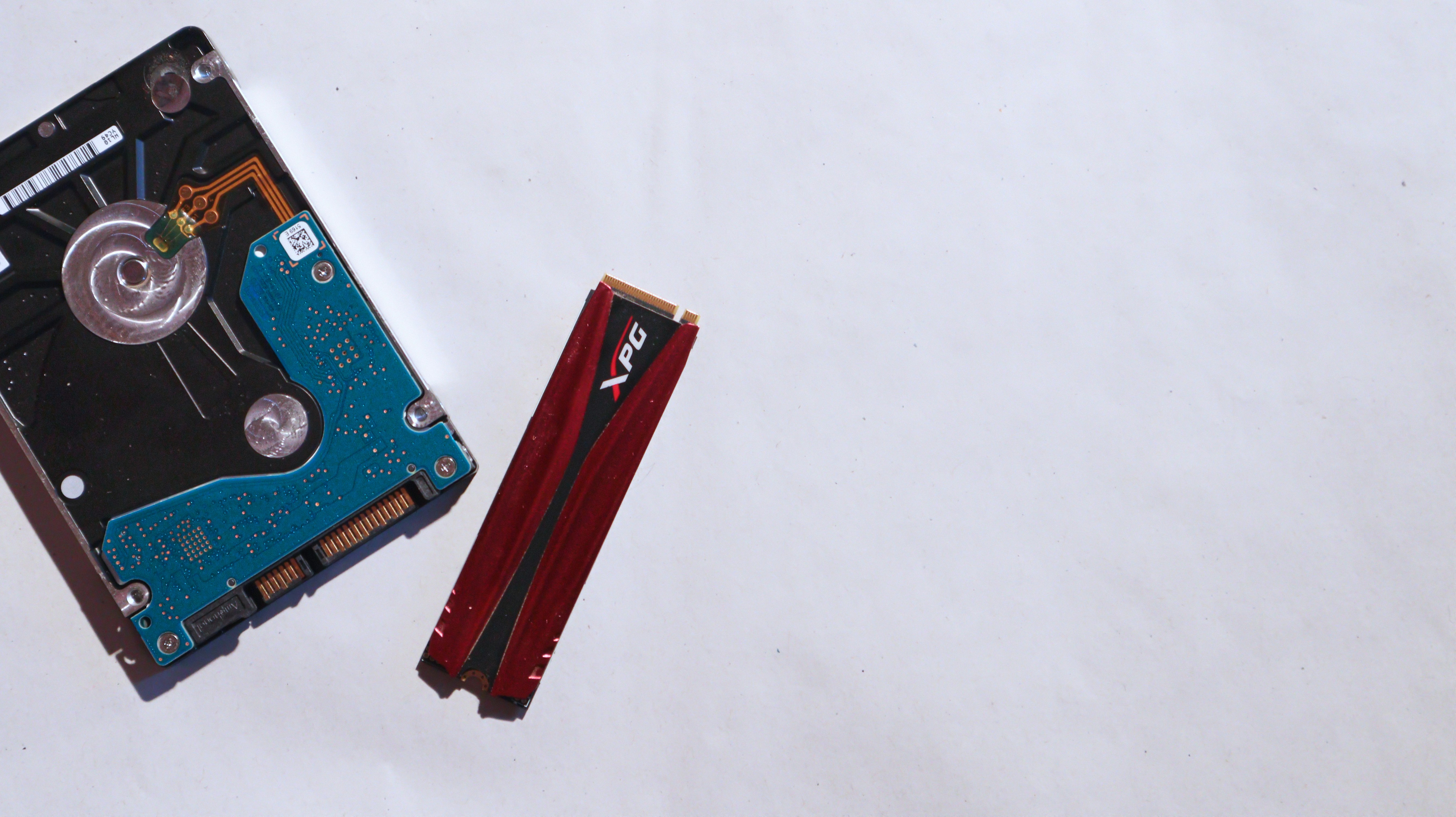
Storage devices, such as hard disk drives (HDDs) and solid-state drives (SSDs), are critical for retaining data long-term. They store the operating system, applications, and user files. The distinctions between these types of storage influence not only data access speeds but also the overall responsiveness of the computer. While HDDs typically offer larger capacities at a lower cost, SSDs provide superior speed and reliability.
Other vital components include the motherboard, which connects all hardware elements, and the power supply unit, which supplies the necessary electrical power. Each component collaborates to create a cohesive and functional computer system. An understanding of these fundamental roles allows users to address performance issues, customize their systems, and make informed decisions when upgrading or purchasing new hardware.
The Central Processing Unit (CPU)
The Central Processing Unit (CPU) serves as the cornerstone of computer hardware, commonly recognized as the ‘brain’ of the computer. Its primary function is to execute instructions from computer programs, effectively managing both data and control flow within the system. At its core, the CPU architecture comprises several critical components, including the arithmetic logic unit (ALU), control unit (CU), and various registers, each contributing to the overall processing capability.
Processing instructions involves a series of stages known as the fetch-decode-execute cycle. During the fetch stage, the CPU retrieves an instruction from memory. The decode stage interprets the fetched instruction, determining the necessary operations. Finally, during the execution stage, the CPU performs the required actions, which may include calculations or data movement. The efficiency of this cycle is heavily influenced by the architecture of the CPU itself, which can vary significantly across different models and brands.
Clock speed and core count are vital parameters affecting CPU performance. Clock speed, measured in gigahertz (GHz), indicates how many cycles per second a CPU can execute. A higher clock speed typically suggests better performance, although it must be analyzed in conjunction with other metrics. Core count, on the other hand, refers to the number of independent units within a CPU that can execute tasks simultaneously. CPUs with multiple cores excel in multitasking and running complex applications, as they allow for parallel processing.
Various CPU types are tailored for specific uses, ranging from general-purpose processors found in home computers to specialized chips designed for servers and high-performance gaming. Understanding the nuances of CPU architecture, performance metrics, and types is crucial for selecting the right processor for one’s computing needs. Overall, a well-chosen CPU contributes significantly to the efficiency and speed of a computer system.
Random Access Memory (RAM)
Random Access Memory (RAM) serves a crucial role in computer hardware as a form of temporary storage that provides the CPU with quick access to data that is actively being used. Unlike permanent storage options such as hard drives and solid-state drives, RAM is volatile, meaning it loses its content when the power is off. This attribute makes RAM essential for running applications and executing tasks efficiently, as it allows data to be read and written at high speeds.
There are various types of RAM, with the most common being DDR (Double Data Rate) variants, including DDR3, DDR4, and DDR5. Each successive generation boasts improvements in speed and energy efficiency, which can significantly influence overall system performance. DDR4, for example, offers higher bandwidth and improved latency compared to its predecessor, DDR3. As technology continues to advance, the development of RAM will further emphasize speed, capacity, and power consumption, thereby enhancing computing experiences.
The capacity of RAM is also a significant factor that affects system performance. Modern computers typically come equipped with anywhere from 4GB to 64GB of RAM or more, depending on the intended use case. For general tasks, such as web browsing and document editing, 8GB may suffice. However, for demanding applications like video editing, gaming, or data analysis, a higher capacity is often necessary to prevent bottlenecks that can slow down processing speeds. Moreover, the speed of RAM, usually measured in megahertz (MHz), can directly impact how quickly data can be transferred between RAM and the CPU. Thus, investing in sufficient and high-speed RAM is essential for optimal performance and a smooth user experience.
Storage Solutions: HDD vs. SSD
Storage is a crucial aspect of any computer system, and understanding the differences between Hard Disk Drives (HDD) and Solid State Drives (SSD) is essential for making informed choices about hardware. HDDs are traditional storage devices that use magnetic disks to read and write data. In contrast, SSDs rely on flash memory to store information electronically, providing a different performance profile.
One of the main advantages of HDDs is their capacity; they generally offer larger storage options at a lower cost compared to SSDs. Ideal for users who require extensive storage for media files, backups, or archives without a significant financial investment, HDDs come in various sizes, often reaching several terabytes. However, they do have slower read and write speeds, which can lead to longer loading times for applications and system boot-up.
On the other hand, SSDs have gained popularity due to their remarkable speed and performance. The absence of moving parts in SSDs allows for quick access to data, resulting in faster system responsiveness, reduced boot times, and improved overall application performance. This makes them particularly attractive for gaming, graphic design, and video editing, where speed is a critical factor. However, their higher price point and capacity limitations can deter some users. While SSDs are available in various sizes, they are generally more expensive per gigabyte than their HDD counterparts.
When considering storage solutions, it’s important to evaluate individual needs. Users focused on speed may prioritize an SSD, while those with a tight budget or extensive storage requirements might lean towards an HDD. Additionally, many modern computers utilize a hybrid approach, combining both HDDs and SSDs to harness the benefits of each. Ultimately, selecting the right storage solution depends on balancing speed, capacity, and cost to meet specific usage scenarios.
Motherboard: The Backbone of a Computer
The motherboard serves as the central hub of a computer system, facilitating communication between different components such as the CPU, RAM, and various peripherals. Essentially, it is a printed circuit board that houses important hardware elements and components, orchestrating data flow and ensuring the integrity of operations. As one of the most crucial computer hardware components, the motherboard not only connects the essential elements but also defines how these parts interact with each other.
At the heart of the motherboard is the chip set, which manages data transfer between the CPU and other parts of the system. This integrated circuit plays a pivotal role in determining the performance capabilities of the motherboard by dictating which CPUs can be utilized and the types of RAM supported. Additionally, the chipset aids in facilitating communication for other peripherals, thus influencing the overall efficacy of the computer.
Another vital component of the motherboard is the Basic Input/Output System (BIOS). This firmware provides the essential software interface that initializes the computer during booting, ensuring that all hardware components are operational and ready for use. The BIOS is crucial for system configuration settings, which can be adjusted to optimize performance according to the user’s needs.
Expansion slots are another key feature of the motherboard, allowing users to add various option cards such as graphics processing units (GPUs), sound cards, or network cards to enhance the computer’s capabilities. These slots enable a degree of customization that can significantly improve a system’s performance based on specific user requirements.
In conclusion, the motherboard acts as the backbone of a computer, interlinking major components to create a cohesive and functioning unit. Its architecture and specifications will ultimately determine a computer’s operational capacity and upgrade potential, making it a foundational element in the overall configuration of computer hardware.
Power Supply Unit (PSU): Keeping Your System Powered
The Power Supply Unit (PSU) plays a pivotal role in the functionality of a computer system by converting the electrical power received from an outlet into a usable form for the internal components. A PSU is responsible for supplying power to essential hardware such as the motherboard, CPU, RAM, and storage devices. Understanding the significance of wattage— the measure of electrical power— is crucial, as it determines the maximum amount of power the PSU can provide.
Wattage ratings can vary widely among different power supply units, and selecting the appropriate wattage is essential for ensuring that all components operate smoothly without overloading the PSU. It is advisable to choose a PSU with a wattage rating that exceeds the total power requirement of the system. This additional headroom helps to accommodate unforeseen spikes in power demand, providing a buffer to ensure stability and longevity.
In addition to wattage, efficiency ratings are another critical factor in choosing a PSU. These ratings, often denoted by the 80 PLUS certification, indicate how effectively a power supply converts the AC input into DC output. A higher efficiency rating often translates into less energy waste in the form of heat, leading to lower electricity bills and a reduced environmental impact. A PSU with a high-efficiency rating can significantly enhance the performance of the entire system while decreasing noise outputs, as they typically require less cooling.
When selecting a power supply unit for a computer build, it is also essential to consider features such as modularity, the number of connectors, and potential expandability. Fully modular power supplies allow for more streamlined cable management, contributing to improved airflow and overall aesthetics within the computer case. By choosing the right PSU, one can ensure that their system remains powered efficiently, effectively supporting all components.
Graphics Processing Unit (GPU)
The Graphics Processing Unit (GPU) is a specialized hardware component primarily responsible for rendering images, videos, and animations, making it essential for tasks involving graphics-intensive workloads such as gaming, video editing, and 3D rendering. The GPU operates by executing parallel processing tasks, allowing it to handle multiple operations simultaneously, which drastically increases performance in visual applications compared to traditional CPU processing.
There are two primary types of GPUs: integrated and dedicated. Integrated graphics are built into the CPU and share system memory, making them suitable for everyday tasks such as browsing the web or streaming videos. These types of GPUs can save on costs and power consumption but may struggle with more demanding applications that require higher graphical performance. In contrast, dedicated graphics cards are separate hardware components with their own memory (VRAM), designed specifically for high-performance tasks. Dedicated GPUs excel in delivering enhanced frame rates and better visual fidelity, making them a preferred choice for gaming and professional design work.
When selecting a GPU, various factors must be considered to ensure it meets the user’s needs. One crucial aspect is the GPU’s compatibility with the existing system, including the motherboard and power supply requirements. Additionally, it is essential to assess the performance benchmarks of different graphics cards, as specific models can vary significantly in terms of capabilities. Users should also consider their primary use case—whether gaming, content creation, or simple everyday tasks—since different tasks demand varying levels of graphical power. Finally, the budget is a significant determining factor in the selection process, as high-end GPUs can be costly but yield unparalleled performance in demanding applications. Understanding these components will facilitate making an informed decision when choosing the right GPU for any computing need.
Cooling Solutions: Keeping Your Hardware Safe
Maintaining optimal temperatures is crucial for the performance and longevity of computer hardware. As components such as the CPU and GPU operate, they generate substantial heat, which, if left unmanaged, can lead to overheating, decreased efficiency, and ultimately component failure. Consequently, effective cooling solutions are essential for any computer build, whether it be for gaming, graphic design, or regular computing tasks.
Among the most common cooling methods are air cooling and liquid cooling. Air cooling systems rely on heatsinks and fans to dissipate heat away from critical components. This method has the advantage of being cost-effective, easy to install, and widely available. The effectiveness of air cooling can be enhanced by ensuring good airflow within the case, which can be easily achieved through proper cable management and using high-quality case fans.
On the other hand, liquid cooling systems utilize a liquid coolant that circulates through tubes connected to a radiator. This approach can achieve superior thermal performance, especially in overclocked systems that require more rigorous cooling. However, liquid cooling is generally more expensive and complex to set up than air cooling. Enthusiasts often opt for custom liquid cooling loops to maximize performance and aesthetic appeal, though all-in-one (AIO) liquid coolers are also available as simpler alternatives.
Another essential aspect of maintaining efficient cooling is the application of thermal paste. This substance facilitates better heat transfer between the CPU or GPU and their cooling solutions. Proper application can significantly enhance thermal conductivity and ensure the hardware operates within safe temperature ranges, thereby prolonging its lifespan.
Choosing the right cooling solution entails assessing the specific requirements of the hardware configuration and intended usage. Factors such as the type of workload, overclocking intentions, and personal preferences will guide users in making informed decisions regarding their cooling systems. Ultimately, an effective cooling solution is vital for sustaining high performance and safeguarding valuable computer hardware.
Future Trends in Computer Hardware
As technology continues to evolve, the landscape of computer hardware is undergoing significant transformations that promise to redefine our interaction with devices and computing power itself. Quantum computing represents one of the most profound shifts in hardware capabilities. Utilizing the principles of quantum mechanics, quantum computers have the potential to solve complex problems at speeds unimaginable with traditional binary computing. This advancement opens avenues in fields ranging from cryptography to pharmaceuticals, wherein problems could be solved exponentially faster. The ongoing research and development in this area mark a pivotal transition toward unparalleled computational proficiency.
Another noteworthy trend is the growing integration of artificial intelligence (AI) within hardware components. As AI applications become increasingly prevalent, hardware designed to support AI workloads is emerging as a necessity. For instance, specialized chips such as Graphics Processing Units (GPUs) and Tensor Processing Units (TPUs) are being tailored to accelerate machine learning processes. The fusion of AI with hardware is paving the way for smarter devices that can adapt to user behavior, optimize resource consumption, and enhance overall performance. This synergy transforms not only how hardware operates but also the nature of user experience.
Moreover, the rise of portable storage technologies reflects another trend in computer hardware. As cloud computing becomes ubiquitous, the demand for efficient, reliable, and portable storage solutions is escalating. Solid State Drives (SSDs) and new formats like NVMe (Non-Volatile Memory Express) are making significant inroads, offering faster data access speeds and improved durability over traditional hard drives. Additionally, advancements in USB technology, such as USB-C, are facilitating quicker data transfer rates and enhanced power delivery, further underscoring the shift towards more agile and compact storage options.
In conclusion, the future of computer hardware is poised for remarkable innovation, driven by quantum advancements, AI integration, and portable storage improvements. These trends are not only shaping the devices we use but also the foundational approaches to how we compute and interact with technology.